
User Management
CowPro User Management – Roles & Permissions
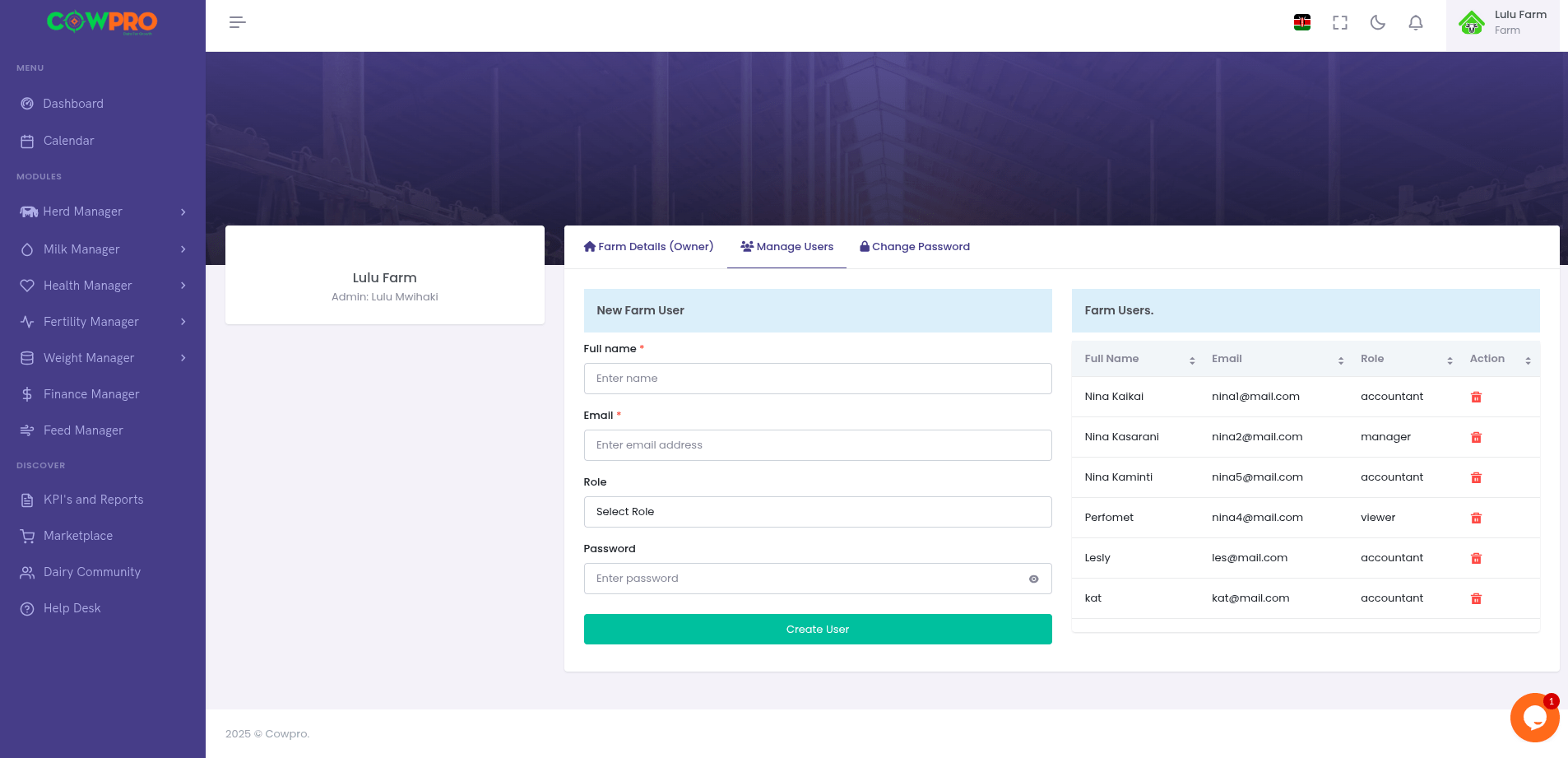
User Management: Easily manage who has access to your farm’s data by creating, editing, and assigning user roles.
Ensure secure and controlled access to sensitive information.
Assign the right roles & permissions to your farm staff for smooth collaboration and accountability.
Purpose:
The User Management module enables farm owners and administrators to add, remove, and manage staff accounts, assigning appropriate roles and permissions for daily operations.
How to:
- Add New User: Enter name, email, contact, and assign role.
- Edit User: Update profile information or change permissions.
- Remove User: Safely delete or deactivate accounts.
- Assign Roles: Define responsibilities for each team member.
Roles & Permissions:
- 👨🌾 Farm Owner: Full control of the system – manage all modules, users, and billing.
- 👩💼 Farm Manager: Manage herd, milk, health, fertility, and staff operations.
- 📊 Accountant: Access financial insights, reports, and subscription management.
- 👨🔧 Staff: Limited access to day-to-day operational data (e.g., recording milk, updating health events).
💡 Tip: Assign only the permissions necessary for each role to improve data security and accountability.